
SumaFlow Kaban app icon SumaFlow Kaban
Open beta · Live now · Android

Your money, finally clear.

Private family budgeting — no bank login, ever.

A kaban is the wooden chest a Filipino household keeps its rice and valuables in. This one holds the budget: envelopes that fill as the month is spent, goals the family saves toward together, and a net-worth view that answers “are we okay?” in about five seconds.

Every feature unlocked for testers · Android phone & tablet · On-device · works offline
The idea

Money that stays in the family.

Most family-finance apps begin by asking for the credentials to your bank. Kaban never does — and the things it gives up in exchange for that are things a household can live without.

  • Family Pulse

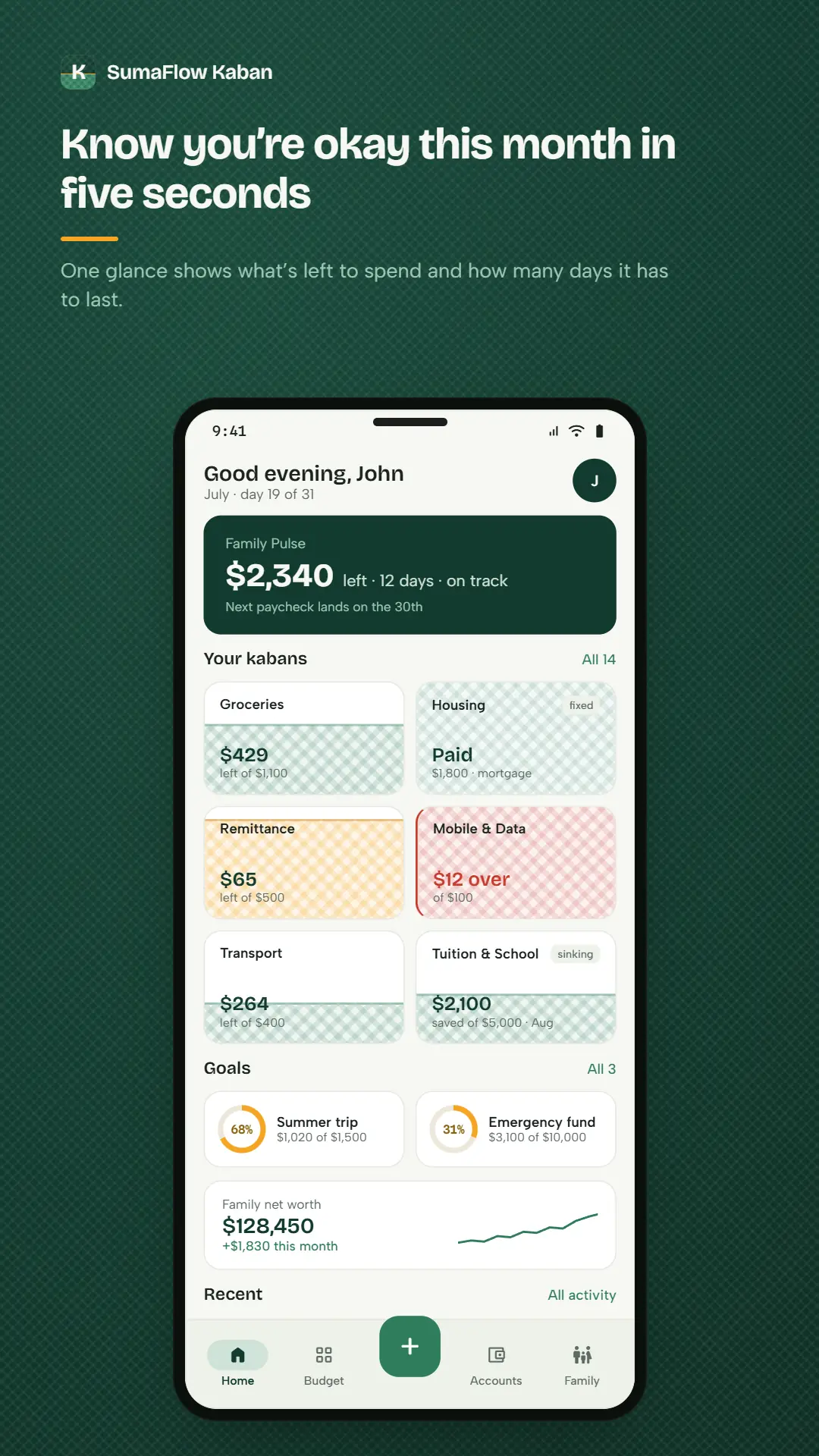
    Open the app and the only question that matters is already answered: what's left this month, how many days it has to last, and whether you're on track. About five seconds, no tapping.

  • Envelopes that fill

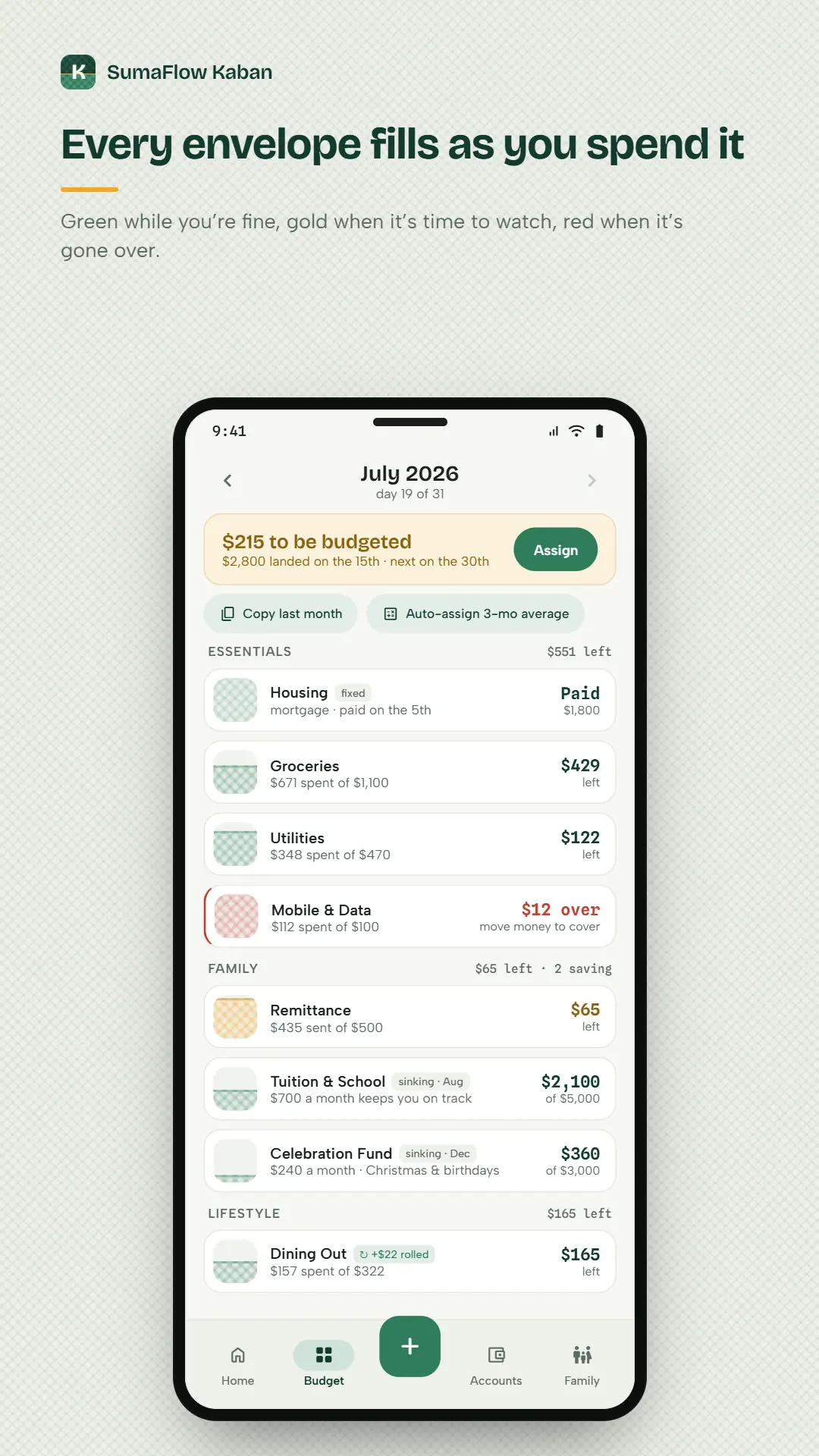
    Every budget is a kaban that fills as the month is spent — green while you're fine, gold when it's worth watching, red once it's gone over. The shape of the card is the status.

  • Log it in three taps

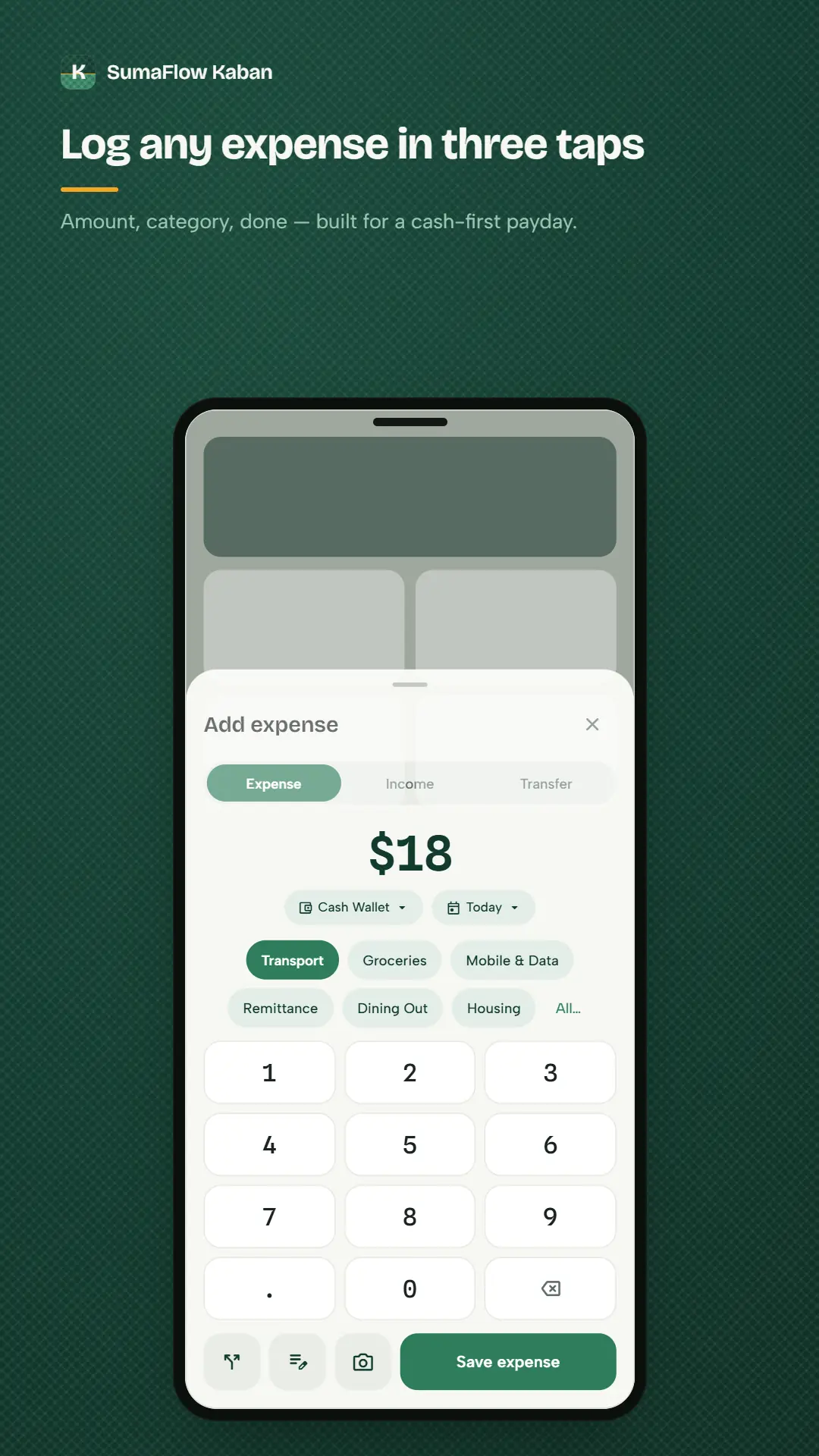
    Amount, category, done. Split a bill across envelopes, record a transfer between your own accounts, or fix it later — the ledger forgives edits and remembers who made them.

  • Shared household books

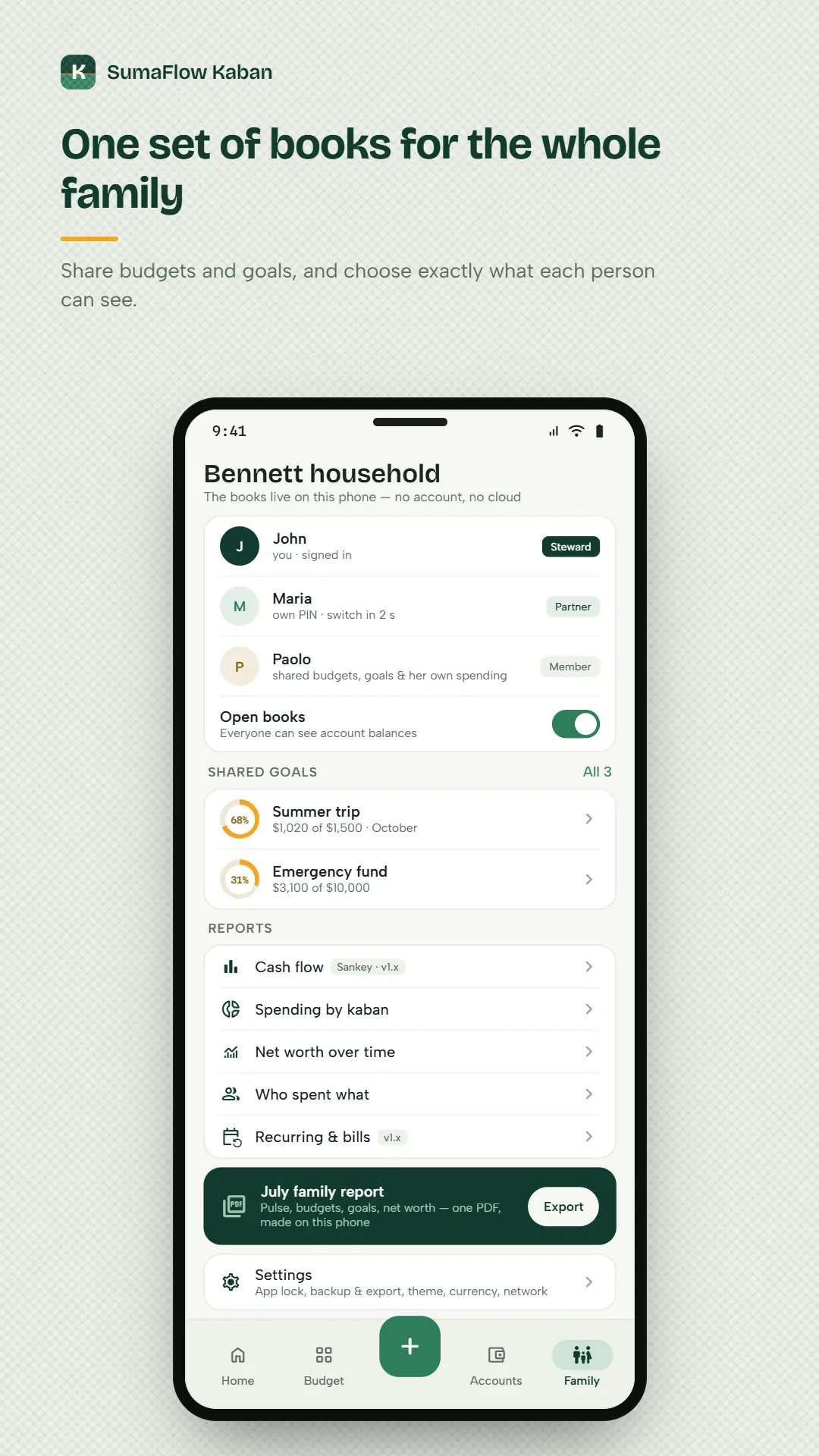
    Everyone in the household, each with a role that decides what they can see and do, and their own PIN. Every entry is stamped with whoever added it. Members are unlimited and always free.

  • Import your statements

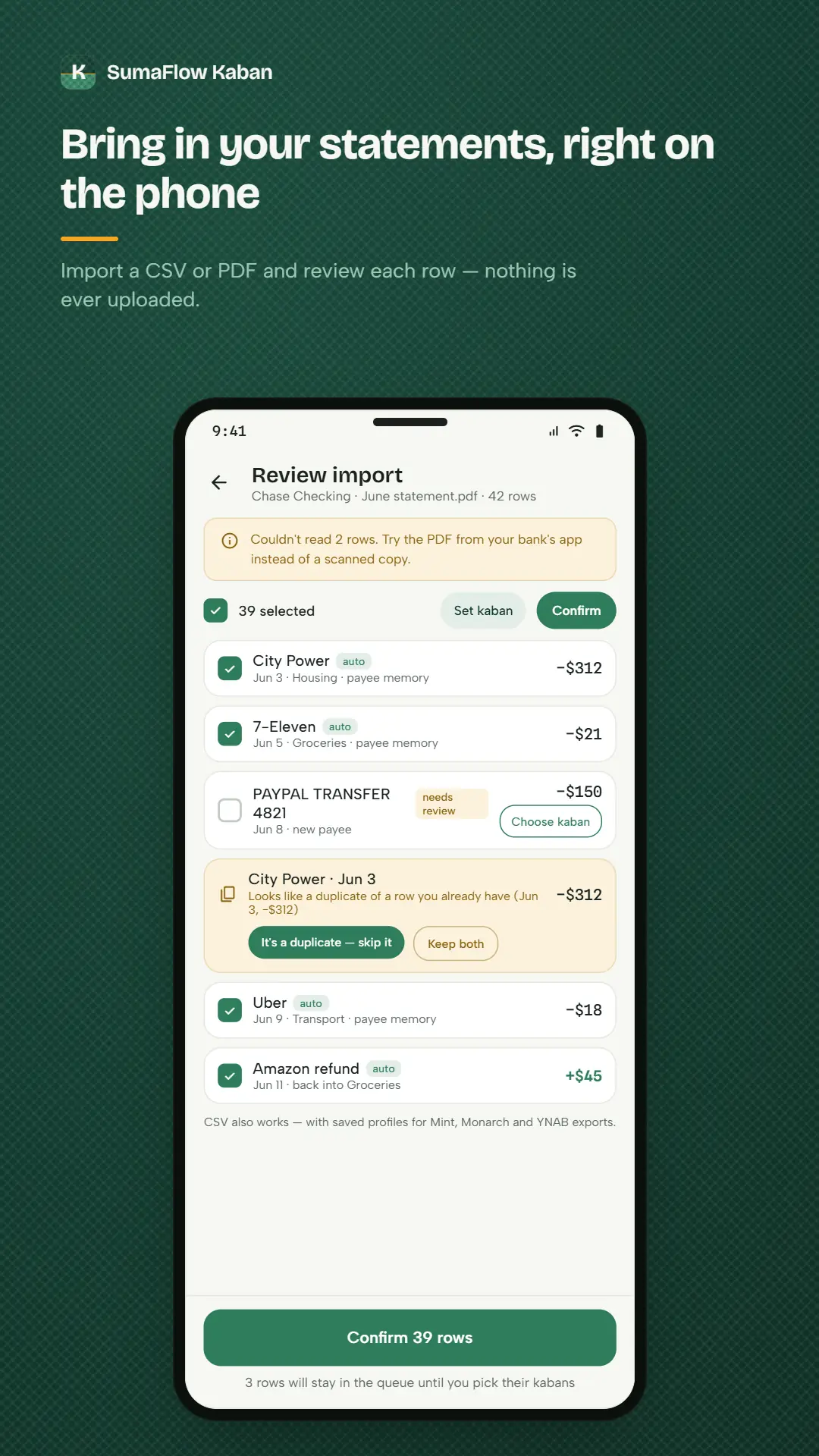
    Bring in a CSV from your bank or e-wallet, map the columns once, and review every row before it lands. Kaban remembers that bank's layout next time, and the import is undoable.

  • Goals and reports

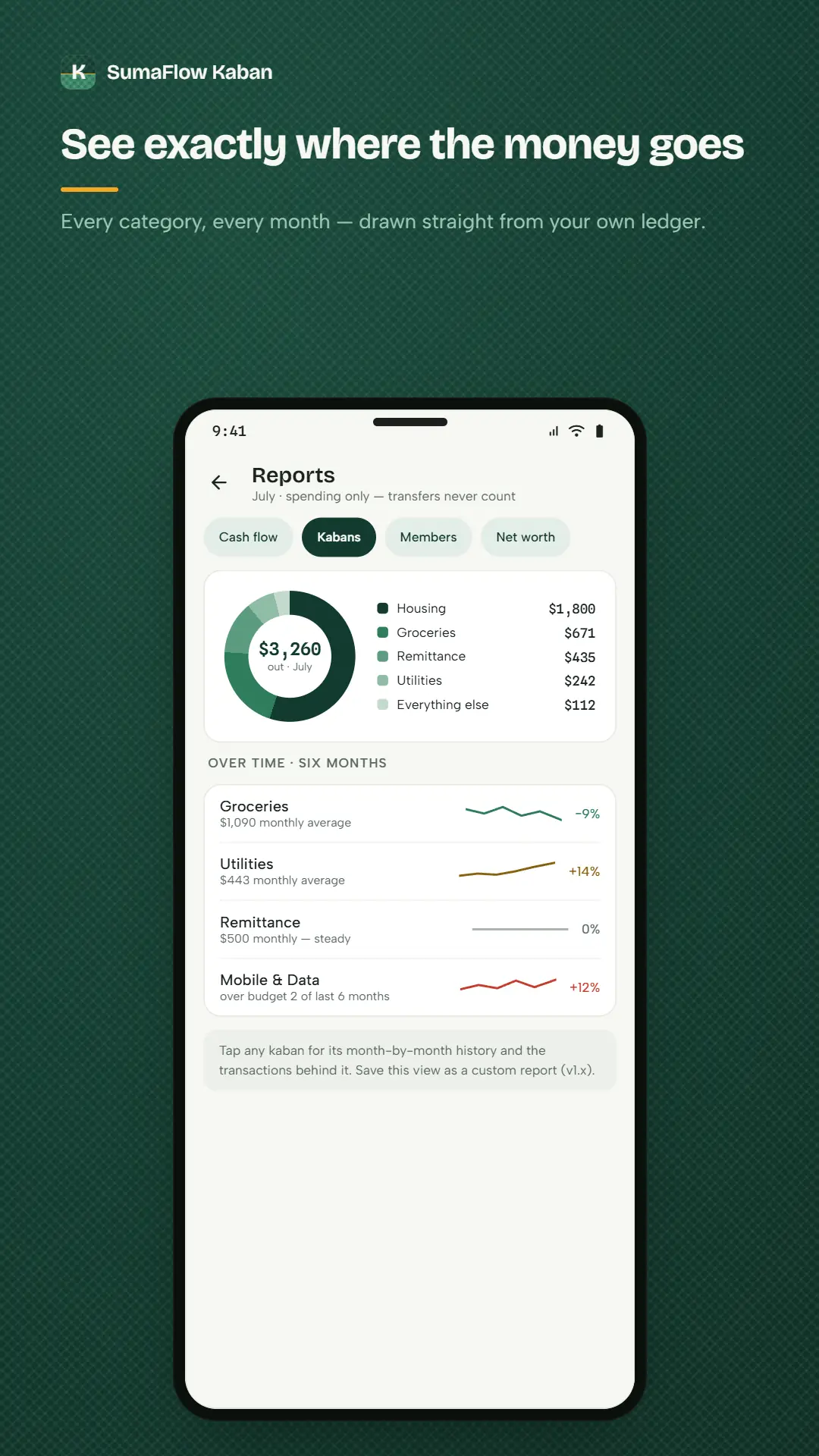
    Shared goals — an emergency fund, tuition, a trip home — with the monthly amount booked for you. Spending, cash-flow and trend reports, plus a Monthly Family Report you can export as a PDF.

No credentials. No cloud. No account.

Kaban never asks for a bank login, because it never needs one. Your books are encrypted on the device, there are no ads and no analytics, and the app works in airplane mode. The trade is deliberate: no automatic feed of transactions, in exchange for a household ledger that nobody else can read, breach or sell.

The screens

A month of money, on one phone.

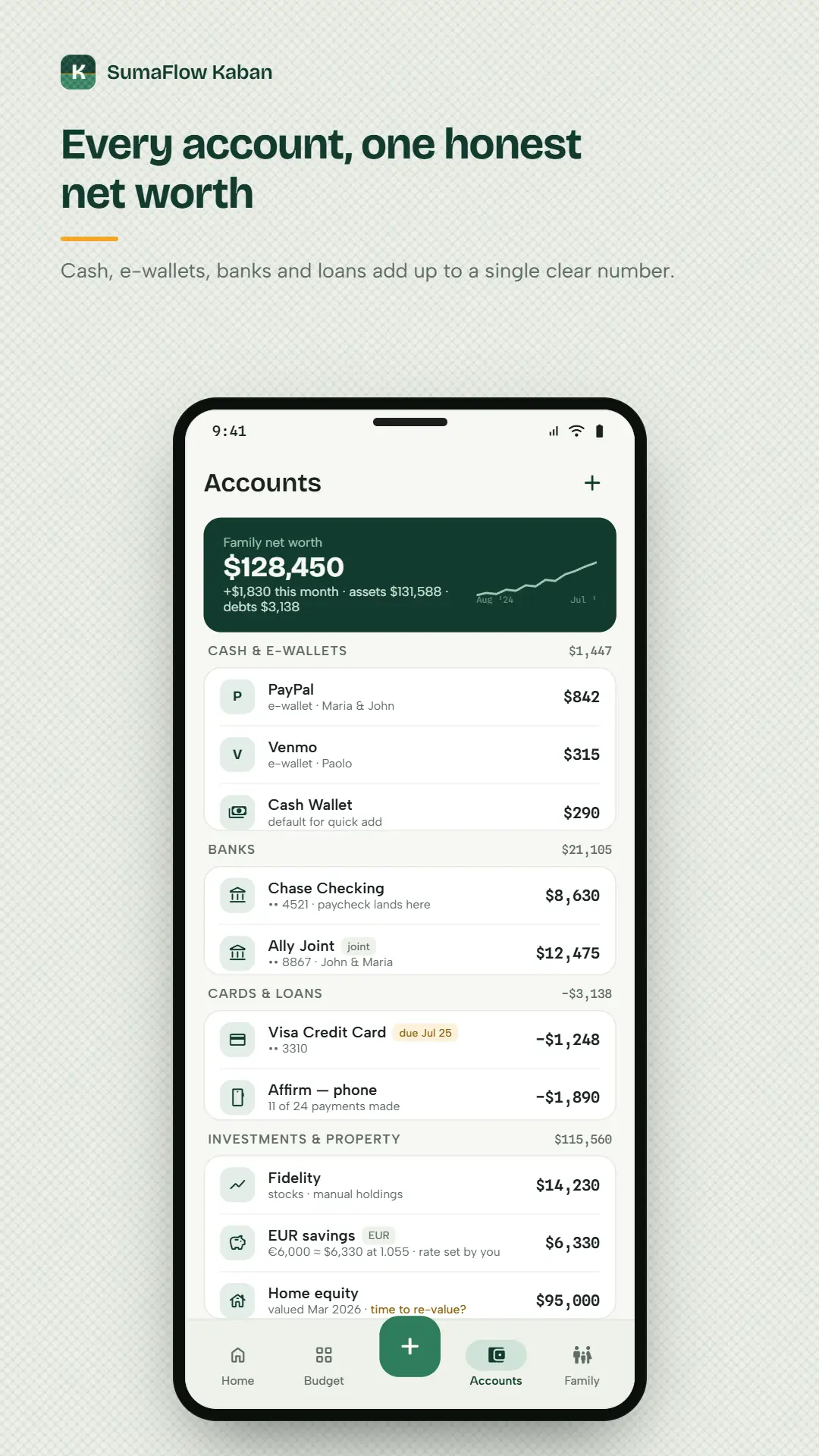
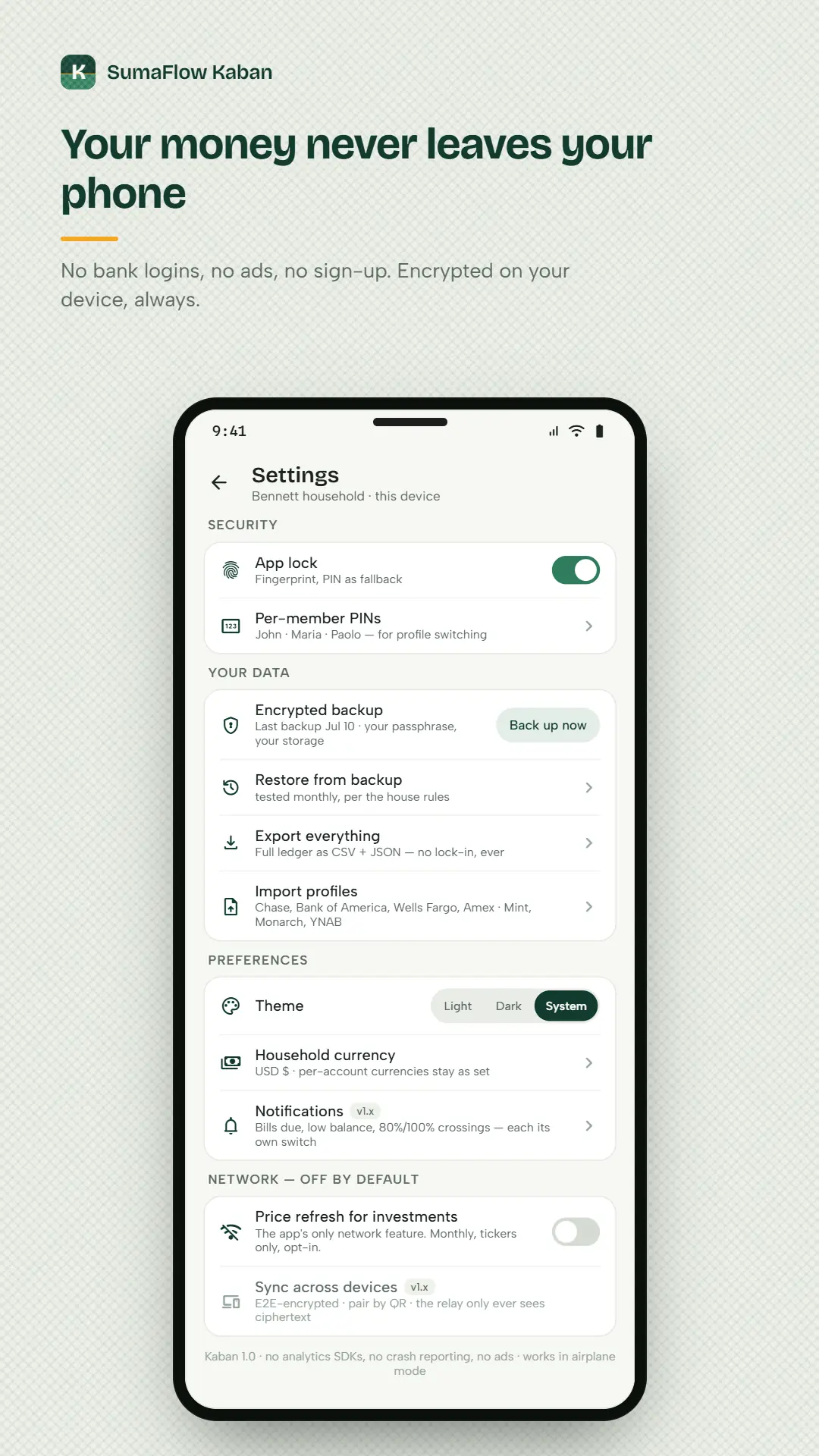
The screens as they ship on Google Play — the pulse you read in five seconds, the envelopes filling, the household, the import, and the settings page where the network section is empty on purpose.

Two of these run ahead of the beta build, and we would rather say so than let a picture make the promise: the import screen shows a PDF statement, where today's app reads CSV, and the settings screen shows an opt-in price refresh for investments that isn't wired up — holdings are valued by hand. Both are on the way; neither is in your build yet.

Your first month

From install to knowing where you stand.

Budgeting apps usually fail somewhere between the enthusiasm of week one and the silence of week three. Here is the whole arc of a month in Kaban, including the parts that ask something of you — because a household that knows what it is signing up for is the one still using it in March.

  1. Set the household up — about three minutes

    Name it, pick the currency the household thinks in, list the accounts and wallets you actually use, and choose your first few kabans. Or skip all of it and open the sample household instead: a fully populated demo family that always lands in the current month, so you can poke at everything before trusting it with a real peso.

    No account, no email, no sign-up. There is nothing to create because there is nowhere to create it.

  2. Give the month a job

    Income arrives and sits as money to be budgeted until you say what it is for. Assign it across your kabans — fixed ones for the rent that never moves, flexible ones for groceries, sinking funds for the tuition and the Christmas that ruin a budget precisely because they are not monthly. Copy last month, or auto-assign from a three-month average, and adjust from there.

    The to-be-budgeted figure at the top moves by exactly what you assigned. Nothing is estimated on your behalf.

  3. Log as you go, or import in bulk

    Three taps for an expense — amount, kaban, done — plus splits for a bill that spans envelopes and transfers for money moving between your own accounts. When the statement arrives, import the CSV: map the columns once, and Kaban remembers that bank next time. Every row waits in a review queue, with duplicates flagged and unfamiliar payees held back for you.

    Nothing lands unreviewed, and the whole import is undoable if it goes wrong.

  4. Glance, mid-month

    This is the part that changes the habit. Open the app and the Family Pulse has already answered the only question anyone actually asks: what is left, how many days it has to last, and whether you are on track. Below it, each kaban fills as the month is spent — green while you are fine, gold when it is worth watching, red once it has gone over.

    Five seconds, no tapping. Put the Pulse widget on your home screen and it is zero.

  5. Close the month, together

    A banner waits until last month is closed. The close sheet walks you through anything overspent — move money from a kaban that came in under, or accept it and start clean — then rolls the balances you chose to roll. Export the Monthly Family Report as a PDF for the kitchen-table review, and start again.

    Nobody has to be the household accountant for this to work. That is rather the point.

Not one step above leaves the phone. No bank is contacted, no statement is uploaded, and no figure is computed anywhere but on your own handset — which is also why the typing in step three is yours to do.

The refusals

Five things it will never do — and what each costs you.

Most of what makes a money app worth trusting is a list of features somebody declined to build. Every refusal below has a price, and your household pays part of it, so here they are with the bill attached rather than sold to you as pure upside.

  • It will not ask for your bank login

    There is no screen anywhere in the app that asks for a banking username, password, one-time code or card number, and no aggregator sitting behind it. Every rival treats that connection as table stakes. It is the single thing here most worth refusing, because a credential you never hand over cannot be spilled by us.

    The cost — Nothing lands in your ledger on its own. You log an expense in three taps, or import a statement you downloaded yourself.

  • It will not keep a copy

    No account, no server, no cloud. The household ledger is an encrypted database on your phone whose key is held in the Android Keystore, and there is nowhere else that a copy of it exists — including here.

    The cost — Uninstall and the household is gone. Backups are yours to take and yours to keep safe, and a forgotten backup passphrase is unrecoverable, because nobody holds a spare.

  • It will not watch how you use it

    No analytics, no telemetry, no crash reporting, no quiet "we only count launches" counter. The app opens no socket and speaks no HTTP. The one internet permission belongs to Google Play Billing, and it carries a product id rather than a peso.

    The cost — We cannot see which features matter to you. Every improvement has to begin with somebody writing in — which is why the tester guide asks five questions instead of reading a dashboard.

  • It will not fetch anything behind your back

    Investment prices do not refresh, and a foreign-currency account converts at a rate you set yourself. Both would be small, reasonable network calls — and an app that makes small, reasonable network calls is how you end up with a money app that phones home.

    The cost — You update holdings and rates by hand on the rare occasions they move enough to matter.

  • It will not charge for your household

    Members, roles and per-member PINs are free and unlimited on every tier, now and after the beta ends. Kaban is sold as a household hub, so charging to add the household would be charging for the premise. Export and encrypted backup stay free for the same reason.

    The cost — Nothing. This is the one on the list we pay for rather than you.

Any of these five could ship next month, and every one of them would make the app easier to sell. That none of them is coming is the only real guarantee on this page.

Built for

A household, not an account holder.

Most money apps are built for one person with one login. A household is several people, several wallets and one shared question — are we okay this month? Kaban gives each person their own way in, and everyone the same answer.

The one who runs the money

You import the statements, assign the month, and hold the whole picture in your head because nothing else holds it for you. Kaban calls this the Steward: full control, the monthly review ritual, and a net-worth trend that finally has somewhere to live.

The partner who shouldn't have to ask

Mid-month, standing in a shop, wanting to know whether this is fine. Partners see everything the Steward sees and can log cash in seconds — no "let me check with him" and no separate spreadsheet nobody updates.

The kid learning on real numbers

A Member sees the shared budgets and goals and their own spending, and balances only if the household turns open books on. Their entries carry their name. It is a first budget with real stakes and no way to break anything.

Anyone who will not hand over a bank login

Households abroad sending money home, cash-first earners, people who have read one breach notification too many, and the sort who checks what an app can reach before installing it. The answer here is short: no credentials, no aggregator, no server.

Free vs SumaFlow Kaban Pro

Free forever, and what Pro will add.

Free is the whole household ledger, by hand — every entry, every person, every report you need to run the month. Pro is the automation and the depth layered on top: the same engine, the same on-device privacy, less manual work.

During the open beta

Nothing in the Pro column is locked. Every Pro feature is switched on for every tester, there is no paywall in the build, and nothing is for sale. The split is published early precisely so you can use all of it and then tell us whether the line lands in the right place.

Free vs Pro, side by side

A comparison of features included in SumaFlow Kaban Free and SumaFlow Kaban Pro
Feature Free SumaFlow Kaban Pro Pro
Free forever — the whole household ledger
Unlimited envelopes, transactions and accounts No caps and no metering, on either tier. Work that happens on your own phone costs nothing per row, so there is no honest reason to charge by the row.
Envelope budgeting and the month close Give every bit of income a job, watch each kaban fill as the month is spent, and close the month with a sheet that walks you through anything overspent.
Quick add, splits and transfers Three taps — amount, kaban, done. Split a bill between envelopes, or move money between your own accounts without it counting as spending.
Statement import and payee memory Import a CSV from your bank or e-wallet, map the columns once, and review every row before it lands. Kaban remembers that bank next time, and the commit is undoable.
Goals and net worth Shared goals with the monthly amount booked for you, and a household net-worth view that answers “are we okay?” without a spreadsheet.
Spending, cash-flow and trend reports The three reports a household actually runs on, free on every tier.
Full export and encrypted backup CSV and JSON export plus an encrypted backup you can restore. Getting your data out is portability, not a feature to sell.
App lock, PINs and biometrics Lock the app, and give each person their own PIN. Security is never a tier.
The whole household Every member, every role, every per-member PIN — unlimited. Kaban is sold as a household hub, so charging to add the household would be charging for the premise. Unlimited Unlimited
SumaFlow Kaban Pro — the work the app does for you
Rules that categorize for you Rename and recategorize automatically as entries land, then apply the rule back over everything you already have.
Recurring & bills Found for you, with a bills view, reminders, and an audit of what the household is quietly subscribed to.
“Heads up” anomaly cards Spending that looks unusual, surfaced before it stings. On the free tier these are simply absent — never teased behind a lock.
Investments Holdings, lots and allocation, sitting inside the same net-worth picture as the rest of the household.
Equity comp and vesting Vesting schedules alongside everything else, and the forward net-worth forecast that reads off them.
Sankey and saved custom reports See where the money actually flows, and keep the views you come back to every month.
The Monthly Family Report PDF The household report for the kitchen-table review, reconciled to the last cent against what the screens show. The raw export stays free.
Sync, hosted backup and Insights Not built yet — the honest status. They join Pro when they ship, at no extra cost to anyone already on it. When they ship
  • No metering, ever

    Nothing counts your envelopes, transactions or accounts. A quantity gate would need a per-unit cost, and there isn’t one.

  • The raw record is never paywalled

    Export and encrypted backup are free forever. Only the branded deliverable — the Family Report PDF — is Pro.

  • A lapse is never destructive

    If Pro ever ends, your rules, holdings and saved reports stay visible and keep working. Only creating new ones is gated.

  • The household is never the product

    Members, roles and PINs are free and unlimited on every tier, and no paid feature will ever be named after a seat.

Pricing isn’t set, and won’t be quoted here until it is. What is settled is the shape: Pro buys less manual work — never permission to budget, and never access to your own money data.

Questions a household asks

What it costs you, not just what it buys.

An app that refuses to touch your bank owes you a plain account of the trade — what you type yourself, what nobody can see, and what happens to the books if the phone goes in the sea.

What does the open beta include, and what does it cost?

It is free, and every feature is unlocked — including everything that will later become SumaFlow Kaban Pro. There is no paywall in the build and nothing is for sale, so you can run a full month through the rules, the recurring bills, the investments and the family report and tell us whether the eventual split is fair. Beta means the polish is unfinished, not the privacy: the architecture described here is the one running on your phone today.

Do I have to connect my bank?

No, and you cannot. There is no screen anywhere in Kaban that asks for a banking username, password, one-time code or card number, and no aggregator behind it. That is a deliberate rejection rather than a missing feature. Balances are the ones you enter or that Kaban derives from your own ledger, and statements arrive as files you choose to import.

What is the catch, if it never sees my money?

You do more of the typing. Without a bank feed nothing appears in your ledger by itself — you log an expense in three taps, or import a statement you downloaded yourself. In exchange, there is no set of credentials to breach, no aggregator holding a copy of your transactions, and no third party with a commercial interest in what your household spends.

Does it work with no signal?

Completely. Put the phone in airplane mode and every part of the app still works, because none of it was ever reaching out. Kaban's own code opens no connection, speaks no HTTP, and contains no client capable of either — a test in the repository fails the build if a network-capable package or a socket appears.

Then why does the app ask for the internet permission?

Google Play Billing, and nothing else. Selling SumaFlow Kaban Pro through Play is only possible with the billing library, which brings android.permission.INTERNET and a Google telemetry component along with it — we tried excluding them and the app will not build. Billing carries a product id and a purchase token, and by construction has no access to your accounts, balances, transactions, payees, envelopes or goals. An earlier version of our privacy policy said the app requested no internet permission at all; that stopped being true, and the policy now explains what changed rather than quietly dropping the paragraph.

Can the whole family use it, and does that cost extra?

Everyone in the household, free and unlimited, on every tier — now and after the beta. Each person gets their own profile, their own PIN and a role that decides what they can see and do, and every entry is stamped with who added it. Kaban is sold as a household hub, so charging to add the household would be charging for the premise. No paid feature will ever be named after a seat.

What happens to my data if I stop paying for Pro later?

Nothing is taken away or hidden. Your rules, holdings, saved reports and members stay exactly where they are and keep working — only creating new ones is gated. Your ledger, your exports and your encrypted backups are never gated on any tier, because breaking a family's finance setup to force a renewal is the opposite of what this app is for.

Can I get my data out?

Always, and it is free forever. Export the full ledger as JSON plus a transactions CSV, saved wherever you choose, or take an encrypted backup — a standard SQLCipher database keyed by a passphrase you pick, which any SQLCipher tool can open and which SumaFlow cannot, because we never see it. Data portability is not a feature we would sell you.

What can it import?

CSV statements from your bank or e-wallet today. You map the columns once, Kaban remembers that bank's layout for next time, and you review every row before it lands — duplicates are flagged, unfamiliar payees are held back for you to categorise, and the whole commit is undoable. PDF statements are not supported yet; the parsers are still to come.

We are paid on different days and spend a lot in cash. Does envelope budgeting still work?

That is the case it was built for. Income lands whenever it lands and sits as money to be budgeted until you give it a job, so a semimonthly paycheck, an irregular commission and cash in a tin are all just amounts waiting to be assigned. Envelopes come in three shapes — fixed for the rent that never moves, flexible for groceries, and sinking funds for the non-monthly things like tuition or Christmas that ruin a budget precisely because they are not monthly. Cash is an account like any other, so a wallet you top up and spend from is tracked the same way a bank is.

If I uninstall, can I get my household back?

Only from a backup you made. There is no server copy, no account and nothing retained anywhere else, so uninstalling deletes everything. That is the direct consequence of the architecture rather than an oversight. Take an encrypted backup once you have real numbers in, and please do not make a beta the only record of your money yet.

We send money home in another currency. Can it handle that?

Yes. The household picks one base currency at setup — that is the number the Family Pulse, the budget and the net worth are all stated in — and individual accounts can hold a different one. A euro savings account or a peso wallet keeps its own currency and converts into the household view at a rate you set yourself, because fetching a live rate would mean a network call, and that is a trade we will not make quietly. A remittance is an ordinary envelope: budget it monthly, watch it fill, and it shows up in the family report like anything else.

Status

Open beta — now enrolling.

SumaFlow Kaban is in Google Play open testing for Android phone and tablet, free to join and free to use. The ledger, the budget engine, the household and the family dashboard are built and running. This is real software with real rough edges, and tester reports are what close the gap.

  • PDF bank statements aren't supported yet. CSV import works; the PDF parsers are still to come.
  • No sync between devices. One phone per household for now — sync is on the roadmap, not in the build.
  • Investment prices don't refresh. Values are entered by hand, because refreshing them would mean a network call.
  • No natural-language questions (“what did we spend on food?”) yet.

Kaban helps a household keep its own books — it isn't financial advice, and it doesn't connect to your bank. Figures shown here are illustrative. Since the beta build includes Google Play Billing, the privacy policy now spells out exactly what that added and what it did not — worth reading before you decide to trust it.

SumaFlow Kaban app icon SumaFlow Kaban
Open beta · Live now · Android

Join the SumaFlow Kaban open beta.

Every feature unlocked, no charge, no bank login and no account. Run a real month through it — envelopes, the household, the import, the reports — with all of it on the handset. Nothing about your money is transmitted, for want of anywhere to transmit it.

QR code to join the SumaFlow Kaban open beta on Google Play
Join the open beta → Already a tester? Open in Google Play →

Point a camera at it · No charge · Phone or tablet

Open testing means software that is still being refined — expect rough edges and tell us about them at [email protected]. SumaFlow Kaban is an independent product. Google Play is a trademark of Google LLC.