SumaFlow Digest app icon SumaFlow Digest
Open beta · Live now · Android

Reads it all. Keeps nothing.

Private, on-device AI for confidential documents.

For the contracts, offers and medical files you'd never paste into a chatbot. Summarize, extract from, and redact them entirely on your phone or tablet — nothing ever leaves the device, so there's nothing to breach, retain, or train on.

Free during the beta · Android phone & tablet · No account · no upload
What it does

Three actions on one private document.

Read, condense, and clean a sensitive file without ever uploading it. You stay the final authority — Digest assists, you verify.

Hero

Redact

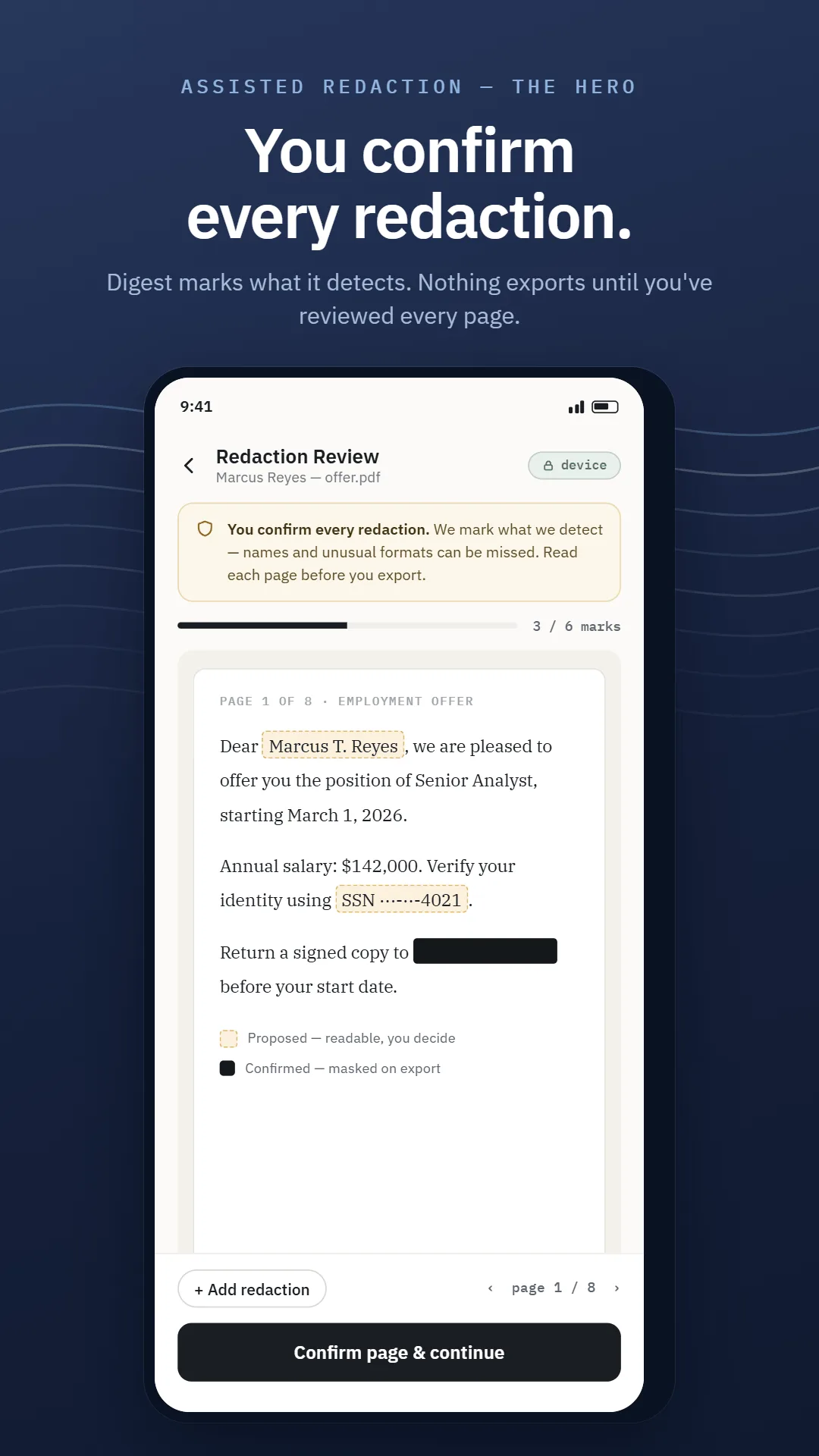
Assisted PII removal you confirm before anything leaves. Names, IDs, account and phone numbers, emails and dates are flagged for your review on every page — for text and scanned images alike.

Never automatic, never claimed "complete." Names and unusual formats can be missed, so the review step is mandatory and you're the final authority.
Summarize

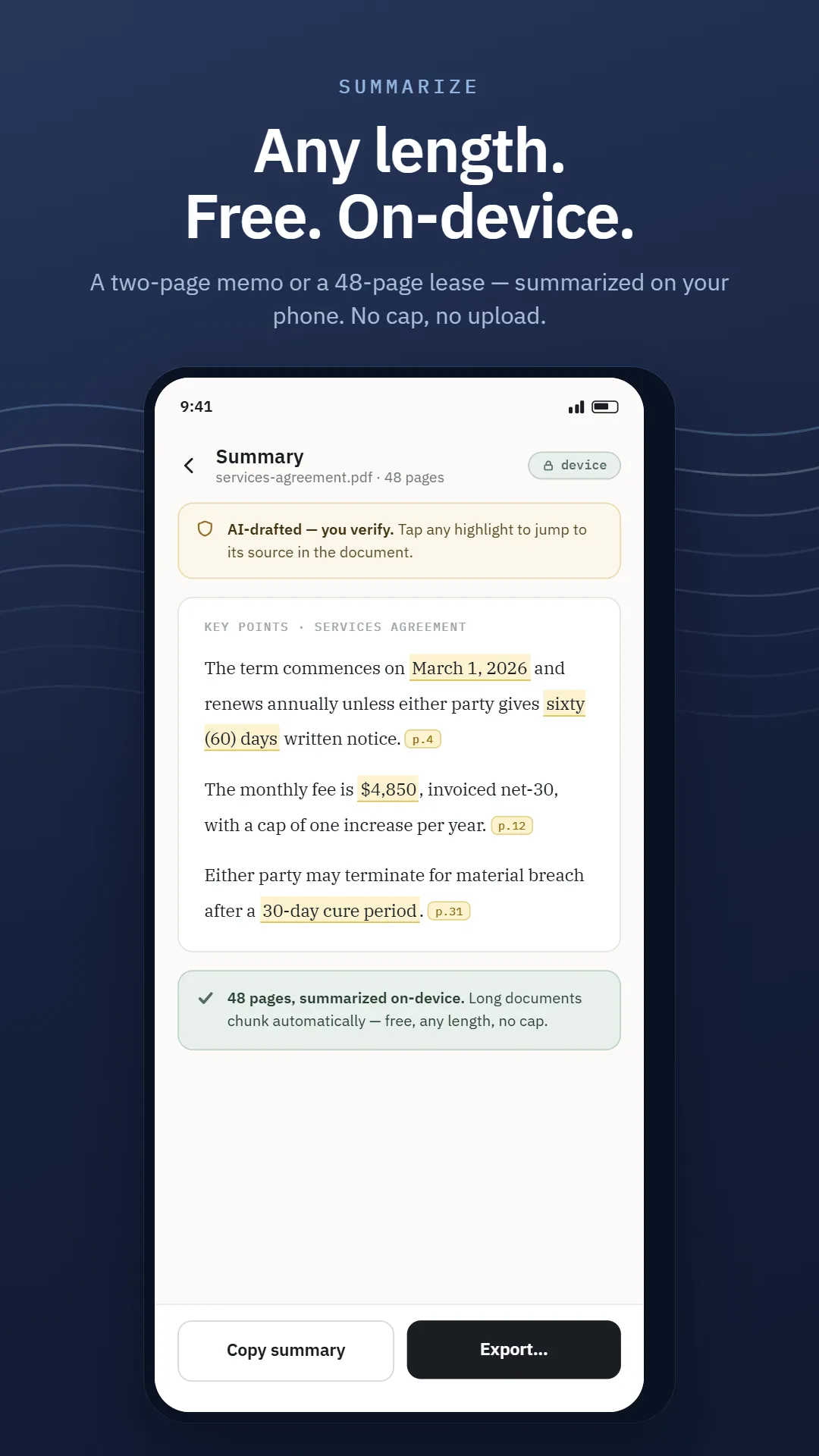
A 40-page contract becomes a one-screen brief — the parties, the terms, the catch. AI-drafted, with citations you can trace back to the source text.

Free at any length — short docs in a single pass, long ones chunked automatically. No cap, no paywall on the summary itself.

Extract

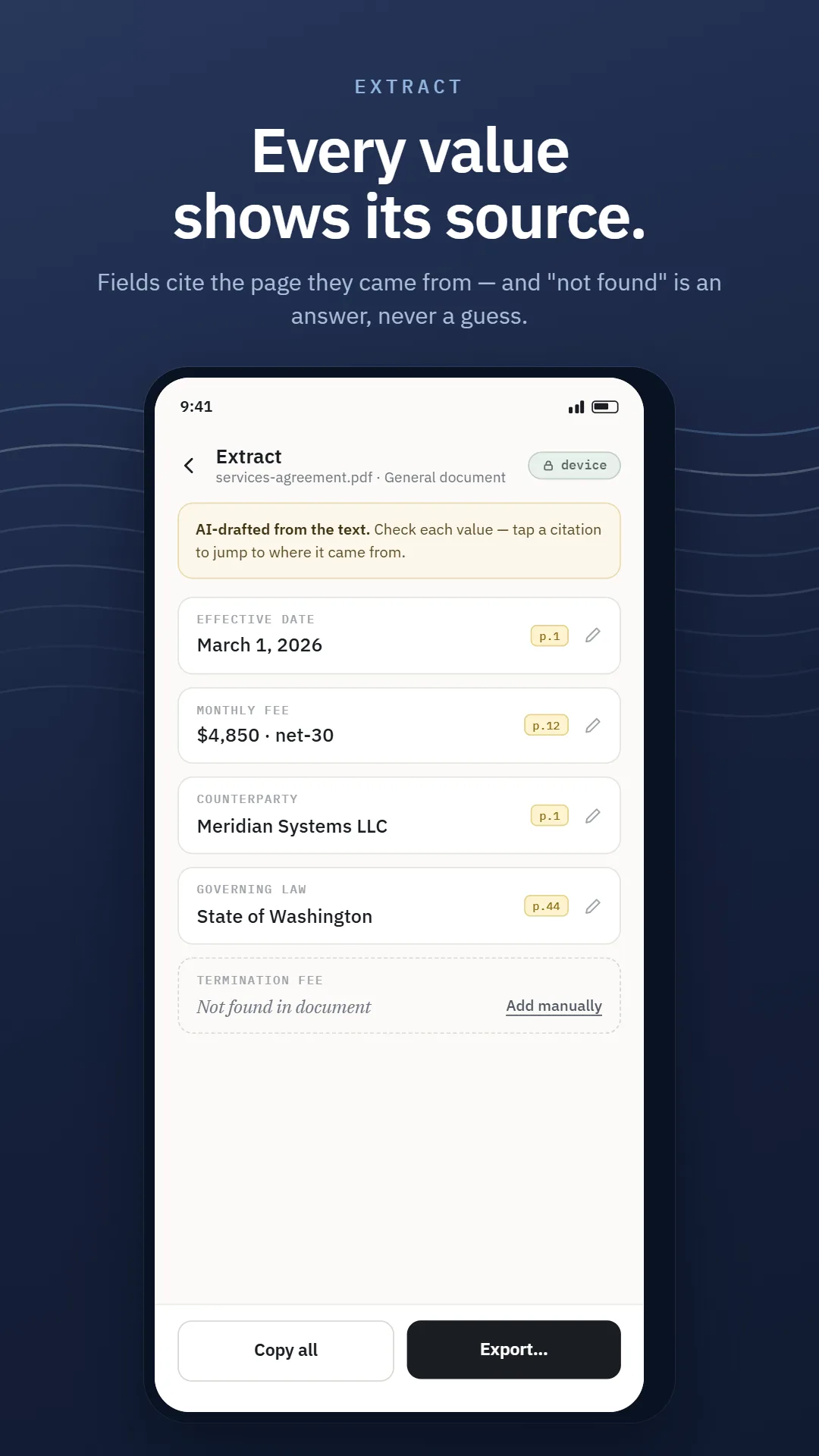
Names, dates, amounts and deadlines, lifted off the page into key facts you can copy. Every value cites where it came from.

"Not found in this document" is a first-class answer — the honest alternative to a confident guess.

Straight from the build

Cut the Wi-Fi. Nothing here changes.

Real screens from the beta, not mockups. Swipe through a document's whole journey — arriving, being read, being marked up, leaving — and count how many times it touches a server on the way.

The whole journey

Four steps. No server in the middle.

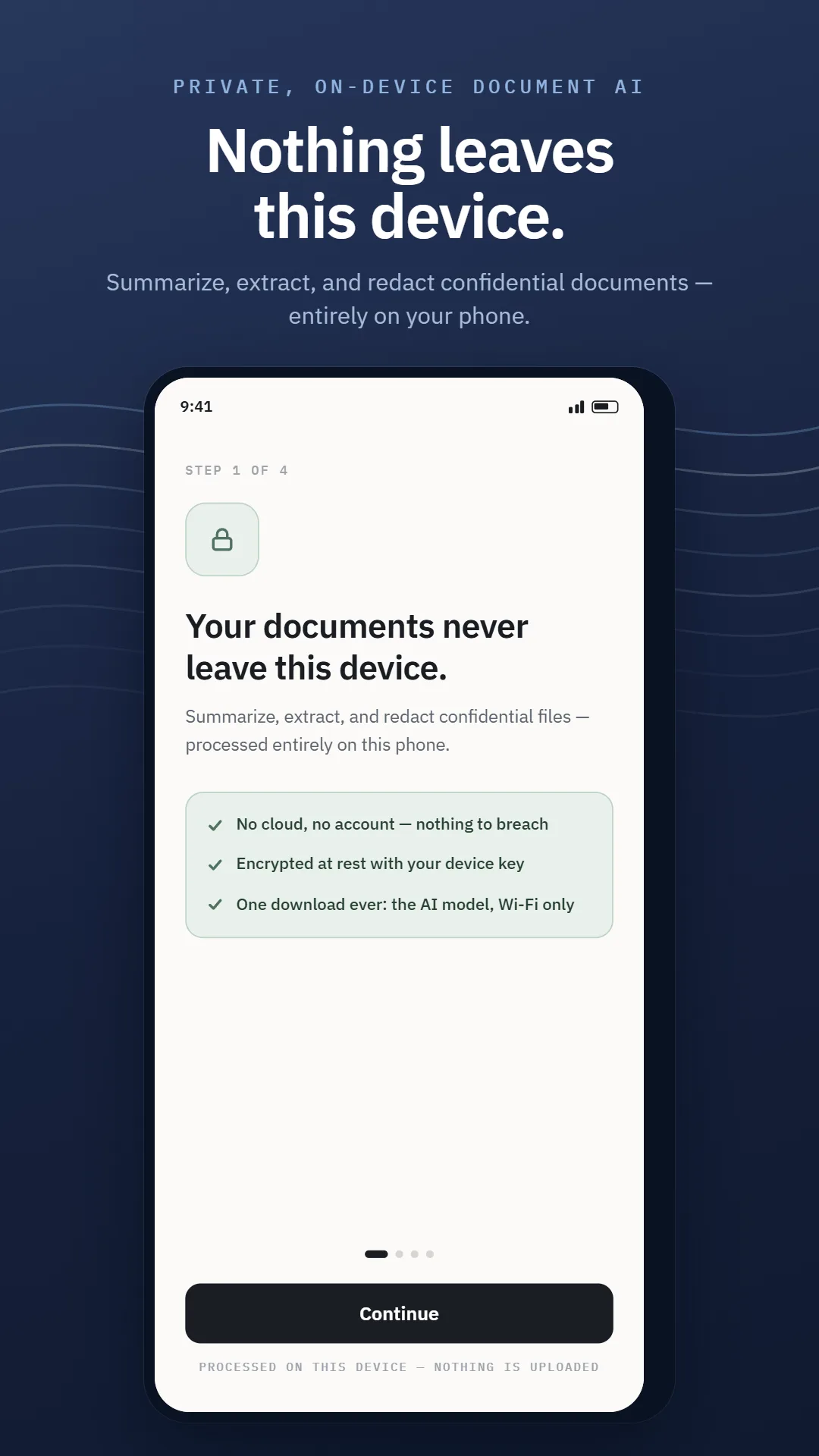
A file arrives, gets read, gets worked over, and leaves only when you send it. Every one of those stages talks to the encrypted store on your own handset and to nothing else. The single inbound connection anywhere in this picture is an optional model download that carries none of your material.

  1. Bring the document in

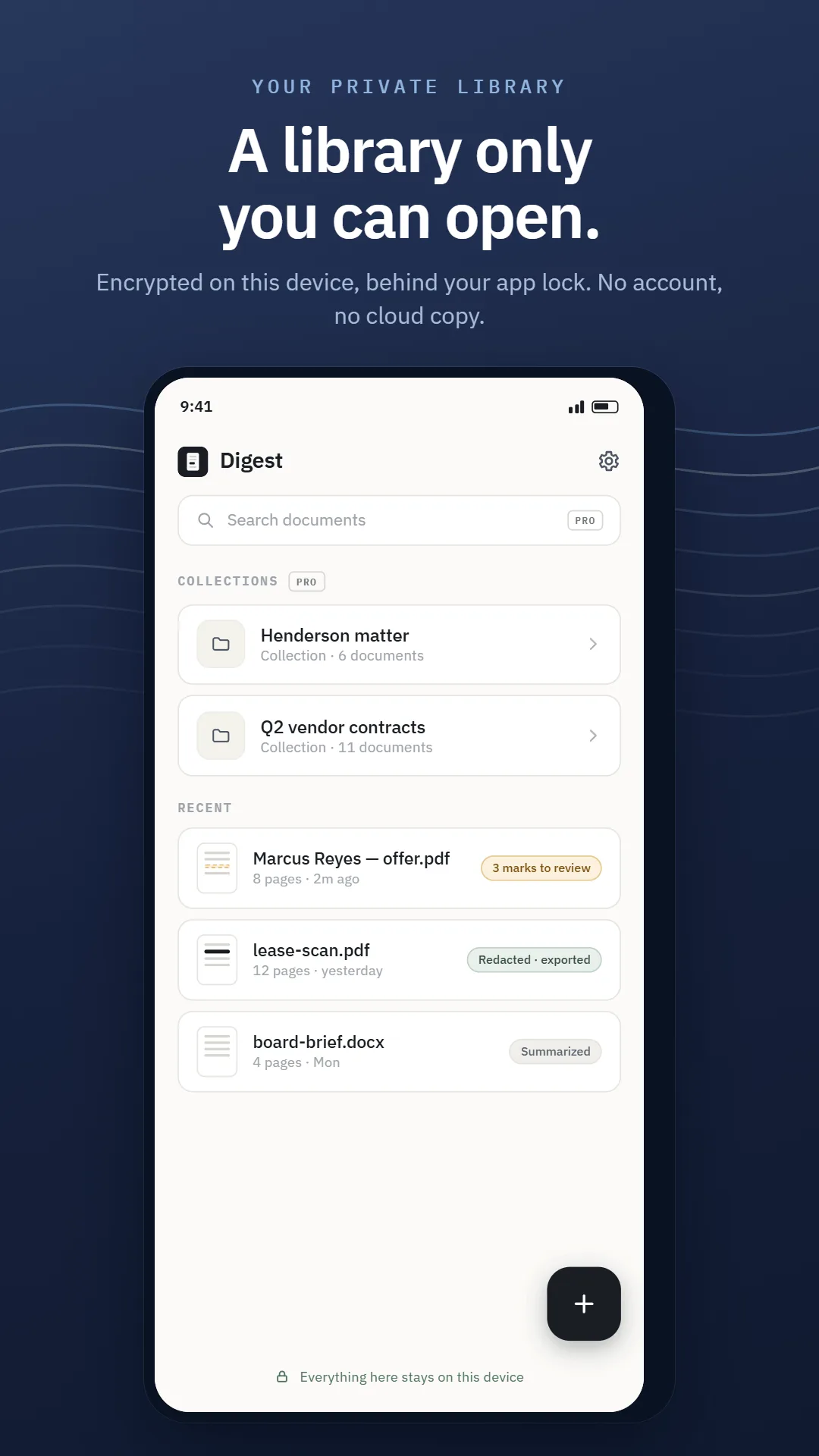
    Digital PDF, scanned PDF or image, DOCX, or a photo you take right there. Phone photos get deskewed, contrast-corrected, denoised and cropped first. The file is encrypted the moment it lands.

  2. Read it on-device

    Google ML Kit recognizes the text on the handset, across Latin, Chinese, Devanagari, Japanese and Korean scripts, and keeps the bounding boxes that later let a mask land exactly over the right pixels. Its cloud sibling is barred outright, and a regression test fails the build if that ever changes.

  3. Summarize, extract, redact

    Summaries and extractions lean on Gemma 4 E2B, an open-weight model executed through LiteRT-LM on the handset itself. Fetching it is optional and offered up front over Wi-Fi; decline, and a deterministic extractive engine takes the job so it still finishes. Redaction proposes marks — you accept or reject each, page by page.

  4. Export, only when you say so

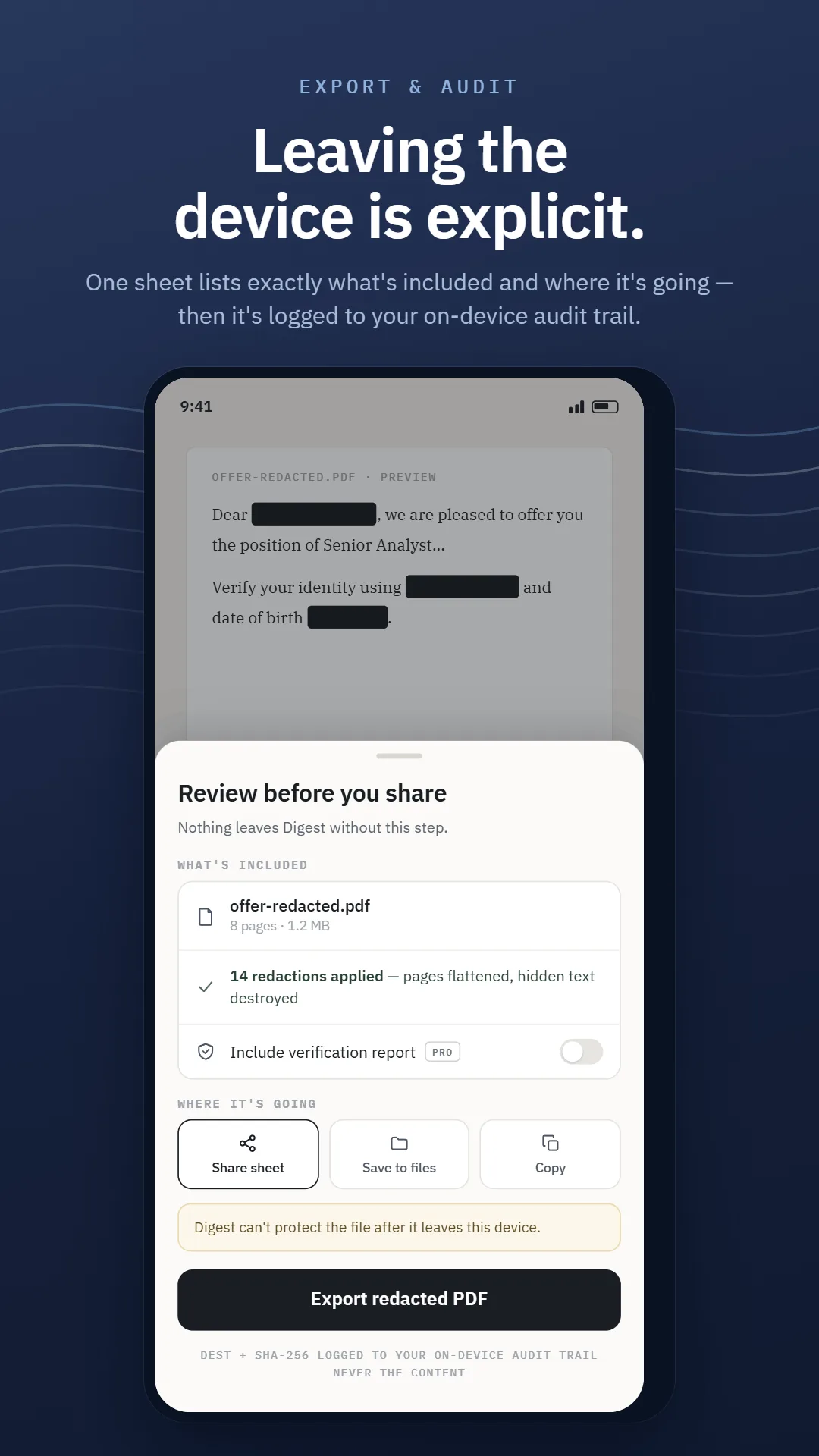
    Confirmed masks are flattened into the exported page — pixels destroyed, not covered — and every export writes an entry to a local, append-only audit log. Nothing moves until you tap the button.

Not one step above reaches past the handset. None of them transmits what you imported — and were a step somehow to try, the packet would arrive nowhere, because we operate no machine that listens for it.

Seven, in writing

Seven commitments. Zero asterisks.

A cloud tool can summarize and redact perfectly well. What it cannot do is stop holding your file on a machine that keeps it, might learn from it, and can one day spill it. That difference is structural, not a feature we shipped. Every line below can be checked against the source or the declared network surface — and breaking one is treated as a release-blocking defect.

01

The document stays put

Bringing a file in, recognizing its text, marking it up, pulling fields out, boiling it down — the whole set executes on the handset in your hand.

02

Unreadable without your device

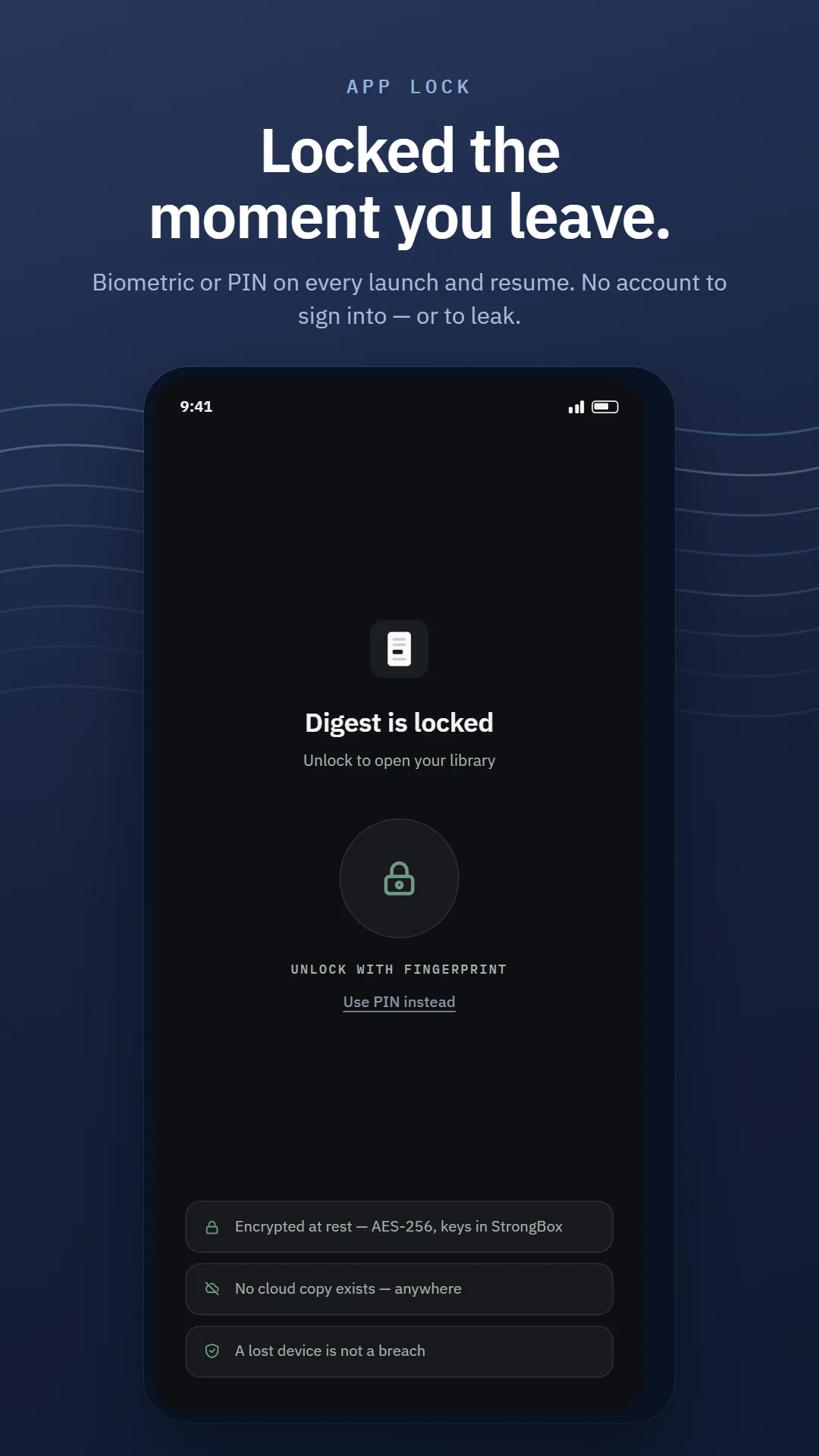
Files sit under AES-256-GCM; the document store is SQLCipher. The keys live in the Android Keystore or StrongBox and never move. Plaintext is never written to disk.

03

One host on the allowlist

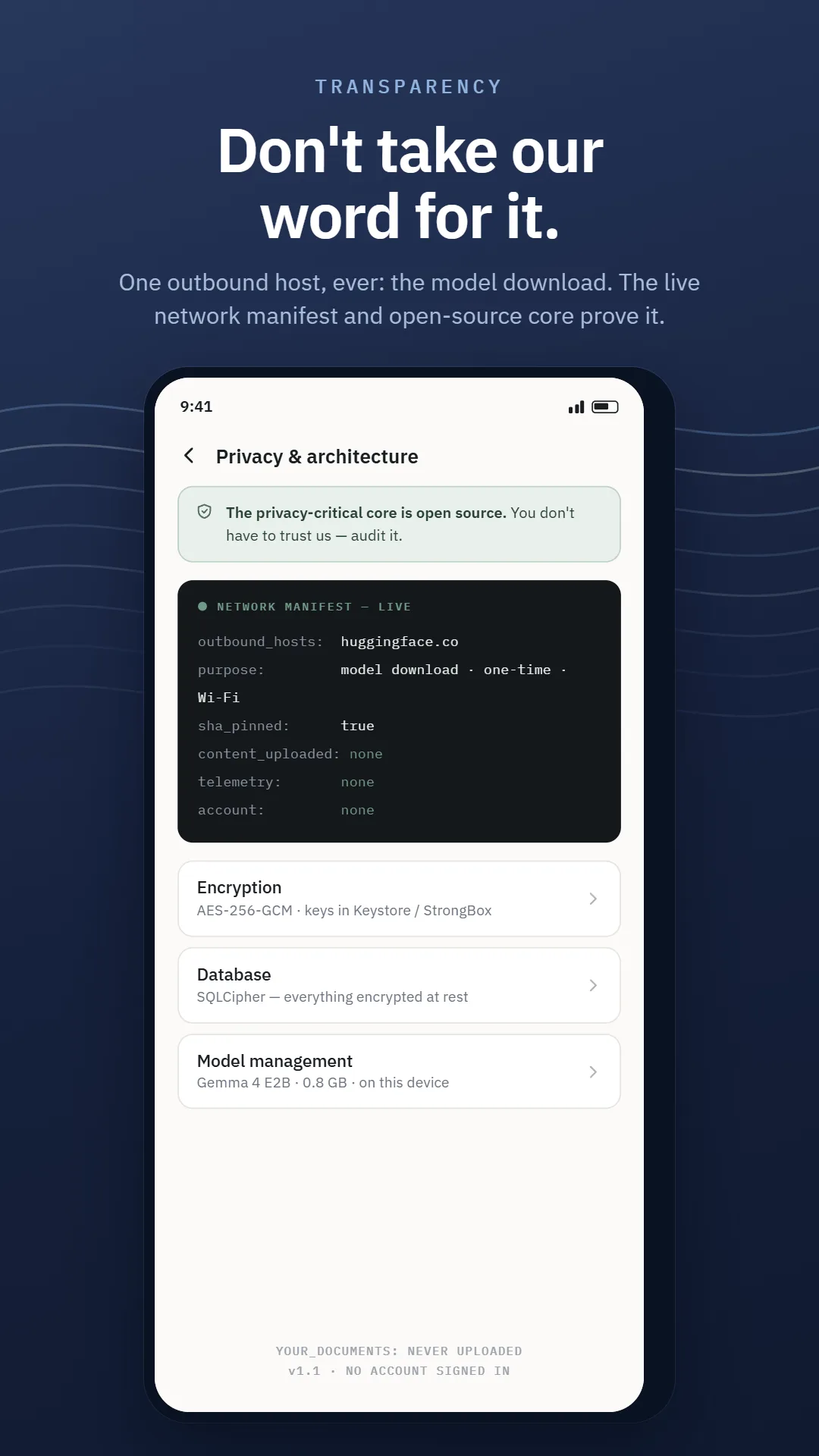
Nothing you import is ever transmitted. There is no usage reporting, no crash beacon, no quiet "we just count launches" counter. A single address is permitted — huggingface.co — and only ever to pull a public model file down.

04

Nothing leaves unreviewed

A redacted file cannot skip the review gate; you sign off page by page. Whatever finally goes out is written to an append-only ledger that lives on your device and belongs to you.

05

There is no account to have

Nothing to register, nothing to sign into, nothing to leak in someone else's breach. A fingerprint or PIN gates the app itself, so a phone left in a taxi stays a lost phone.

06

The blueprint is public

Which component touches what, written in plain English rather than legalese — published here, and mirrored on a screen inside the app so you can check it without leaving.

See the blueprint →
07

Audit it yourself

The pieces that carry the weight — the cipher layer, the key handling, the declared network surface — sit in a public repository. Take our word for none of it.

Read the source →

P.S. — Our servers saw nothing at all, because we don't have any.

Built for

When “just paste it in” isn't an option.

Digest doesn't care what kind of document you hand it, so treat the four below as illustrations rather than a guest list. The common thread is simpler than any job title: the file in front of you isn't yours to hand to a stranger's server.

Solo attorneys and immigration lawyers

Contracts, NDAs, filings, and client files that are privileged by default. The moment the habit of "paste it into a chatbot" fails is the moment a document cannot be uploaded at all — that is the moment this is built for.

Clinicians and therapists

Intake forms, notes, referrals, and records carrying patient identifiers. Redact a file down to what a colleague actually needs to see, and confirm every mark yourself before it leaves the phone.

HR, finance, and accounting

Offer letters, employment agreements, payroll and account documents full of names, salaries, and identifiers. Summarize the terms, pull the key dates, and strip the personal data before it circulates.

Technical and privacy skeptics

The sort who opens the repository before the app, diffs the declared network surface against what the binary actually does, and treats a marketing claim as a hypothesis. Everything load-bearing was published so that this audit ends well.

Free vs SumaFlow Digest Pro

Pro buys a better summary, never permission to summarize.

Free is private document AI, whole and unmetered: read it, condense it, lift the facts out, black out what shouldn't travel. Pro is the professional workspace layered on top — the same on-device architecture, with the tools a billable matter needs.

During the open beta

Nothing in the Pro column is locked. Every Pro feature is switched on for every tester, and nothing is for sale while open testing runs. The split is published now so you can work through all of it on real files and tell us where the line belongs.

Free vs Pro, side by side

A comparison of features included in SumaFlow Digest Free and SumaFlow Digest Pro
Feature Free SumaFlow Digest Pro Pro
Included in every tier
Summarize · Extract · Redact All three actions on any document you bring in — the whole single-document loop, not a trial slice of it.
Summarize at any length Short docs in a single pass, long ones chunked automatically. No page cap and no paywall on the summary itself.
On-device OCR and import Digital PDFs, scanned PDFs, images, DOCX and camera photos — deskewed, denoised and recognized on the handset, across Latin, Chinese, Devanagari, Japanese and Korean.
Mandatory redaction review Digest proposes marks, you confirm every one page by page. Never automatic, never claimed complete, and never a Pro upsell — the review step is the product.
Encrypted storage and app lock Documents encrypted at rest with keys held in the device keystore, behind a biometric or PIN lock.
Data ownership and every export path Your files and everything Digest makes from them are yours to take out. Export is not a tier.
Export audit log Your own append-only record of what left the device and when. The raw log is free; the branded report built from it is Pro.
No account, no upload, no telemetry One outbound host is permitted — the one-time AI model download — and a test in the public repository fails the build if a second appears.
SumaFlow Digest Pro — the professional workspace
Verification report A branded, shareable proof-of-redaction you can hand to a client or a court — the deliverable, built from the audit log that stays free.
Collections and matter management Organise documents by client, case or project instead of one long library.
On-device full-text search Search across every document you hold, with the index never leaving the device.
Batch runs and version compare Put many documents through at once, and redline two versions of the same one against each other.
Template packs and custom schemas Deeper, per-document-type extraction — and your own field sets when the packs do not fit. General fields Packs + custom
AI summary controls Tune length and detail. The never-invent faithfulness floor stays on either way — Pro tunes the summary, it does not loosen it. Faithful default Detail + tuning
High-fidelity model and key dates The larger on-device model for sharper summaries, plus dates lifted out of the document and turned into reminders. Standard model E4B + key dates
Risk and obligation flagging Clauses worth a second look, surfaced for you. Informational only — it is not legal advice and never pretends to be.
Redacted-image export Confirmed masks flattened into the exported image with the underlying pixels destroyed, not merely covered.
Ask-the-document Q&A Ask a question of one document and get an answer grounded in cited spans — with “not found in this document” as a first-class reply.
  • Permission is never the product

    Pro buys a better summary, a deeper extraction, a shareable report. It never buys the right to summarize, extract or redact at all — that is the whole app, and it is free.

  • The raw record is never paywalled

    Your documents, every export path, and your own append-only audit log stay free forever. Only the branded verification report built from that log is Pro.

  • Redaction review is never a tier

    The mandatory page-by-page confirmation is the safety feature. A confirmation step you have to buy would not be one, so it sits on the free side and always will.

  • No metering on length

    Nothing caps the pages you may summarize or the documents you may hold. On-device work has no per-page cost, so there is no honest basis for charging by the page.

Pricing after the beta isn’t set, and won’t be quoted here until it is. What is settled is the shape: Pro buys a better summary, never permission to summarize.

Before you install

Straight answers, including the awkward ones.

What does the open beta include, and what does it cost?

It is free, and every feature is unlocked — including everything that will later become SumaFlow Digest Pro. The whole single-document loop is there — import, summarize, extract, redact, export — with no paywall in the build and nothing for sale while open testing runs. Beta means the polish is unfinished, not that the privacy architecture is: the on-device boundary described on our architecture page is the one running on your phone today.

Does it work with no signal?

Completely. Put the phone in airplane mode and every feature still works — bringing a file in, recognizing its text, marking it up, pulling fields out, boiling it down. Digest reaches for the network exactly once in its life, to fetch the AI model, and that is opt-in, held to Wi-Fi, and strictly a download.

Do you store my documents?

There is nothing on our side to store them in. Your files, their recognized text, and everything Digest produces from them are written to your device and stay there. No machine of ours ever receives a byte of it, so the question of what we retain never arises — we would have to build somewhere to put it first.

Can you read my documents?

We could not if we wanted to; nothing you import is ever transmitted to us. There is no usage reporting, no crash beacon, and no analytics layer quietly along for the ride. One address is permitted — huggingface.co, for the model file — and an automated test fails the build the moment a second one appears. That test ships in the public repository, so you can run it against us rather than trust this paragraph.

Is the redaction guaranteed to catch everything?

No, and any tool that claims otherwise is lying to you. Digest uses a hybrid pipeline — deterministic patterns for things like SSNs, account numbers, emails, phone numbers and dates, plus entity extraction and model-based name detection. Names and unusual formats are the weak point, and recall is worse in non-Latin scripts. That is exactly why the review step is mandatory: Digest proposes, you confirm every mark page by page, and you remain the final authority on what ships.

When I redact an image or scan, is the text really gone?

Yes. Image redaction is not a black rectangle drawn on top. Confirmed masks are flattened into the exported page with alpha-blending off, so the underlying pixels are destroyed rather than hidden. Copying text out of the exported file, or removing a layer in an editor, cannot recover it.

What file types can it read?

Digital PDFs, scanned PDFs and images (via on-device OCR), DOCX, and photos you take with the camera. Phone photos go through a preprocessing pass — deskew, contrast, denoise, and edge-crop — before recognition. OCR is multi-script, with a setting for Latin, Chinese, Devanagari, Japanese, and Korean.

What devices are supported?

Anything on Android 10 upward, phone or tablet. Generated summaries come from Gemma 4 E2B running through LiteRT-LM, which needs a one-time model file — optional, Wi-Fi only, and the app tells you the size before it fetches anything. Turn it down, or run short on memory, and a deterministic extractive engine steps in: blunter prose, same facts, and the job always finishes.

What happens if I lose my phone?

Files are AES-256-GCM encrypted and the document store is SQLCipher-encrypted, with keys held in the Android Keystore or StrongBox. A biometric or PIN app lock gates launch and resume. A lost device is a lost device, not a breach — and because nothing was ever uploaded, there is no second copy anywhere to worry about.

Is SumaFlow Digest HIPAA, GDPR, or bar-association compliant?

No app can be, and we hold no certification to wave at you. Compliance describes how a practice operates, not a piece of software it happens to use. What the design does give you is a shorter conversation: with nothing transmitted anywhere, there is no processor agreement to negotiate, no sub-processor list to maintain, and no vendor whose breach becomes your disclosure. Whether that satisfies your particular obligations is a judgment for you — take the blueprint page to whoever advises you before you rely on it.

Is this legal or medical advice?

No. Digest summarizes, extracts from, and redacts documents you already have. Summaries are AI-drafted and can be wrong, so every claim cites the source text for you to check. "Not found in this document" is a first-class answer rather than a confident guess. You remain responsible for the work and for what you share.

How do I report a bug or leave the beta?

Email [email protected] — device, document type, and what happened is the most useful thing you can send. Because we collect no telemetry, a report from you is genuinely the only way we learn something broke. You can leave the beta at any time from the same Google Play opt-in page you joined on.

Status

Open beta — now enrolling.

SumaFlow Digest is in Google Play open testing for Android phone and tablet. It's free to join and free to use while it's in beta. This is real software with real rough edges — the architecture is finished and tested, the polish isn't, and your reports are what close that gap.

Beta pricing after launch isn't set yet. Digest assists with your work — it isn't legal or medical advice, and redaction is assisted, never guaranteed complete. You remain responsible for what you share.

SumaFlow Digest app icon SumaFlow Digest
Open beta · Live now · Android

Join the SumaFlow Digest open beta.

No charge while testing runs. Work through your confidential files — condense them, lift the key facts out, black out what shouldn't travel — with all of it happening on the handset. Not one byte is transmitted, for want of anywhere to transmit it.

QR code to join the SumaFlow Digest open beta on Google Play
Join the open beta → Already a tester? Open in Google Play →

Point a camera at it · No charge · Phone or tablet

Open testing means you're using software that is still being refined — expect rough edges and tell us about them. SumaFlow Digest is an independent product. Google Play is a trademark of Google LLC.